


Okay you just built a website and it looks FIREE!!
But can people find it?
Because mine couldn’t.
I was obsessed with making a “good looking” website for Table for One. And I was hell bent on making sure that I pass all the SEO, AEO, and GEO checks. So I literally spent a whole day reading guides and watching videos to find everything I was supposed to do.
And I was sure I covered all the bases.
But when I actually ran an audit on the site, I saw that a bunch of my pages were never in the llms.txt, the sitemap that was submitted wasn’t updated, and there were a bunch of different flaws that I am too embarrassed to share.
And I was pissed.
So I fixed all of it. Here’s everything I learned and everything I would do if I had just launched a website.
Why Do I Need This?
In the age of AI, the best way to get in front of your target buyer is to show up when they ask ChatGPT, Claude or Google a question. And that is what AEO and GEO are for.
And everyone today agrees on two things:
SEO is still the base. AI tools find websites the same way search engines do. So if Google can’t read your site, ChatGPT probably can’t either.
AI trusts what other people say about you way more than what you say about yourself. So a Reddit thread, a blog post, a newsletter about you matters more.
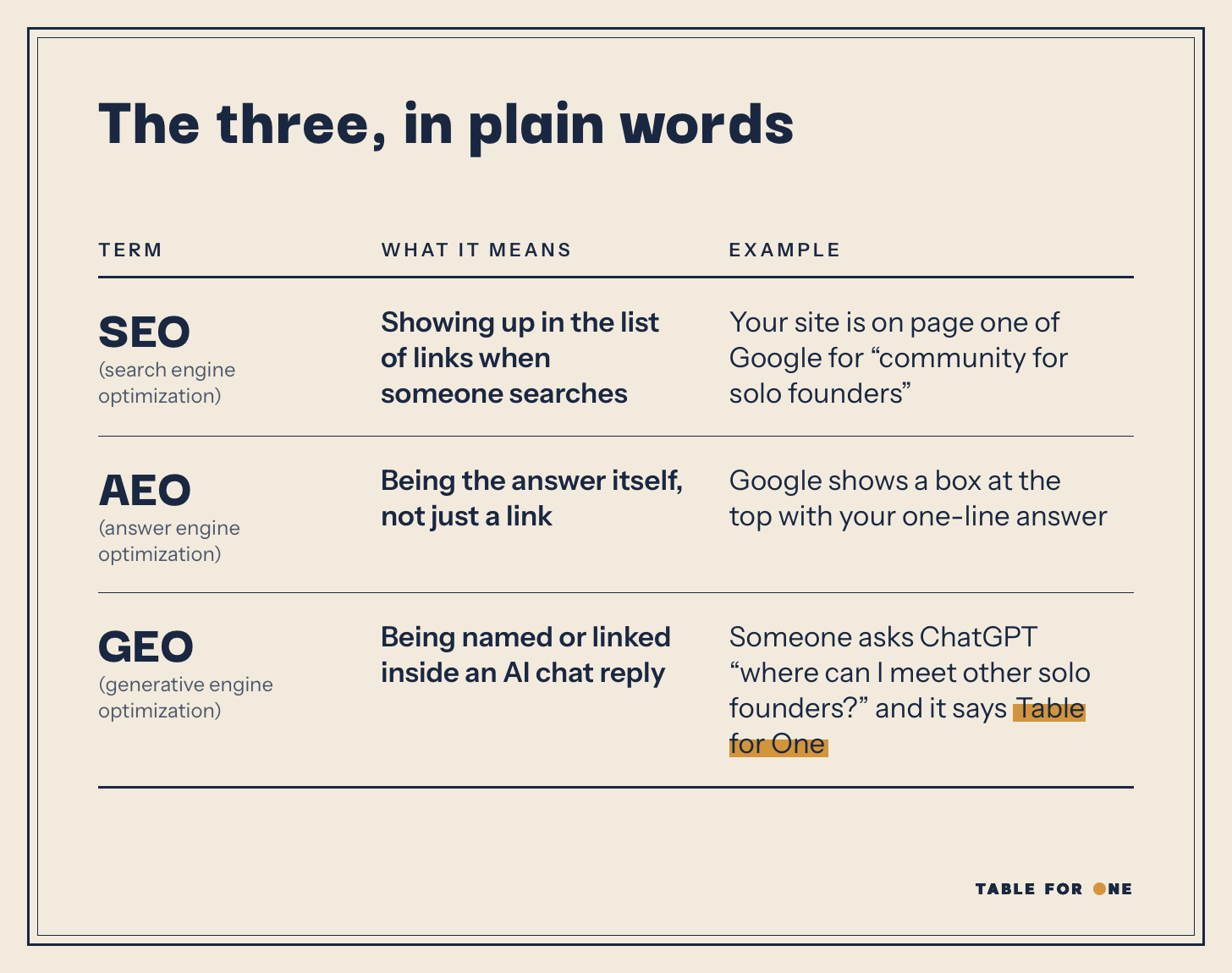
The bottom line is that to show up in any of the three, your page has to be findable, readable, and clear about what it is and who it’s for.
And for GEO you also need to make sure that your site is not blocking any crawlers or bots.
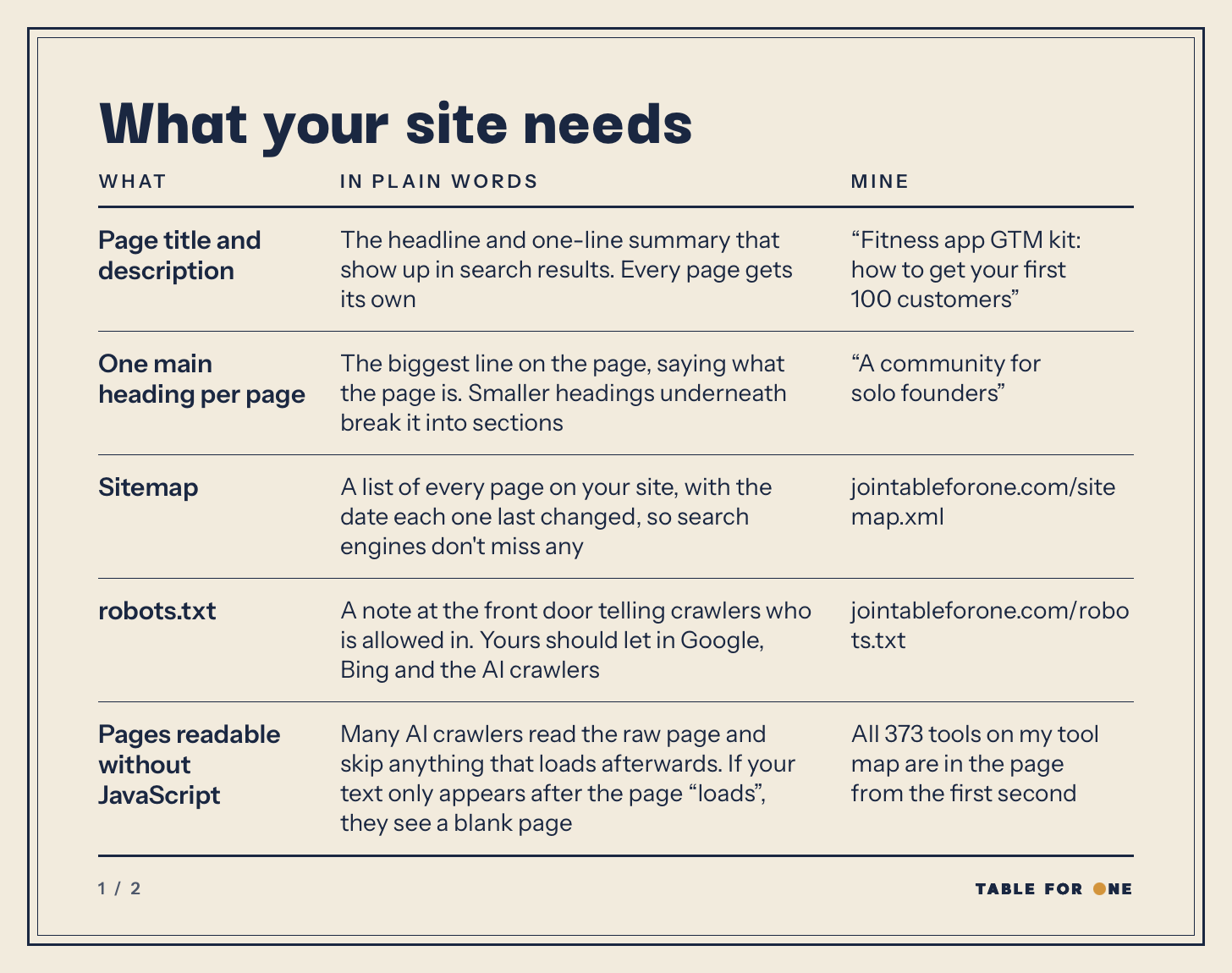
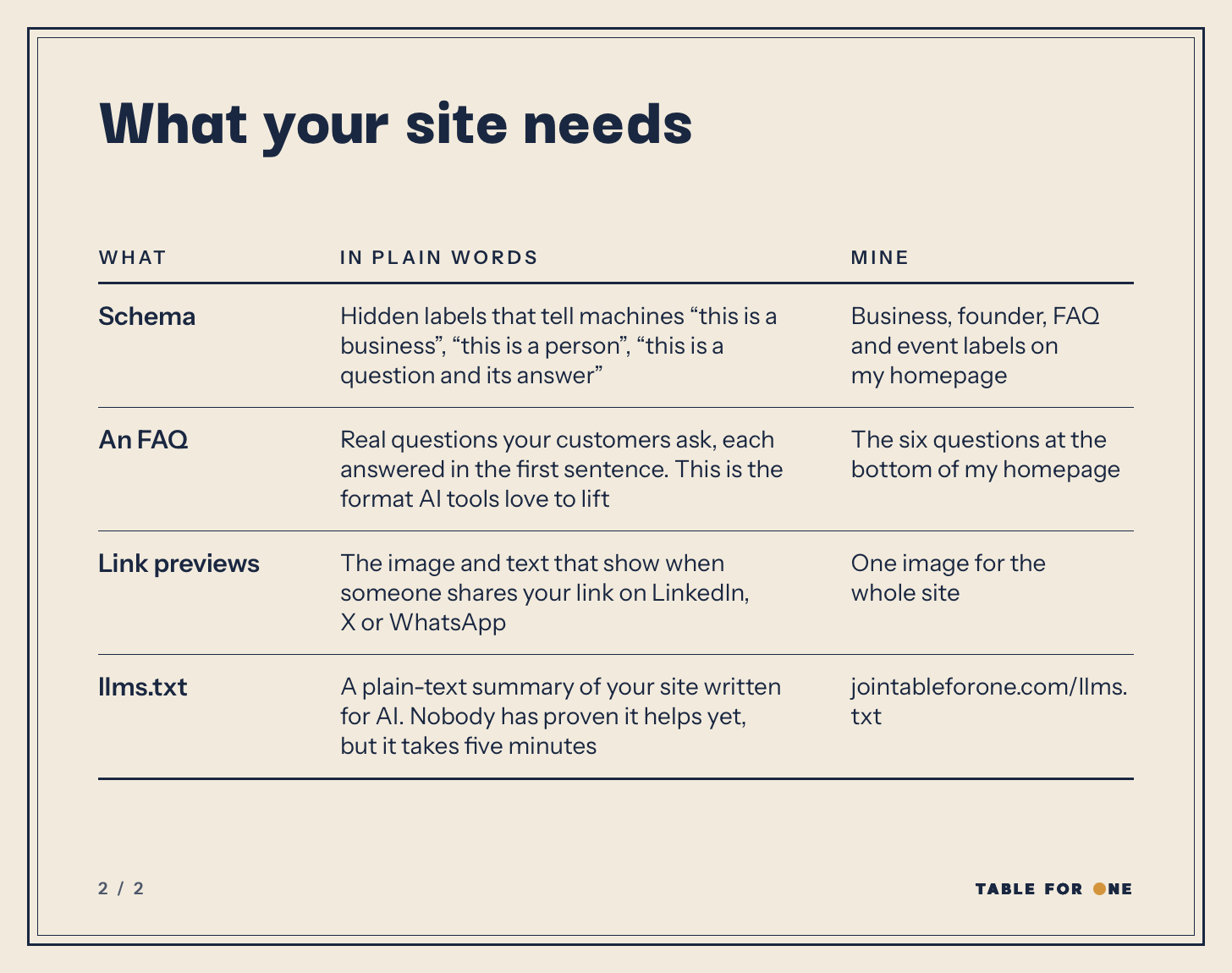
What Your Site Needs
Get these nine things right and your website will be optimized for all the AI agents in the world.
The Prompts
Paste these into whatever tool you have used (Claude Code, Codex, Cursor, Lovable, Bolt, Replit etc etc) one at a time and in order. Make sure to follow through on the checks.
1. See what you already have
This changes nothing. Just checks what you already have.
Check my website for SEO, AEO and GEO. For every page, tell me if it has: a page title, a meta description, one main heading (H1), schema markup, a canonical URL, alt text on images, and link preview tags. Also check whether sitemap.xml and robots.txt exist, whether robots.txt blocks any AI crawlers, and whether each page’s text is in the HTML before JavaScript runs. Give me a simple table of what is there and what is missing. Don’t change anything yet.
2. Titles, descriptions and headings
This helps you write the title and summary that Google shows for each page. The title and summary are essentially the first things people read.
For every page, add a unique page title under 60 characters and a meta description under 155 characters that says what the page is and who it is for. Make sure each page has exactly one H1. My business: [one line on what you do and who it is for]. Plain language, no keyword stuffing.
Show me the full list before you apply it, with a short checklist for me to review it: does each title match what’s actually on that page, does anything promise something I don’t offer, and is my business described the way I’d describe it. Wait for my go-ahead before changing anything.
This prompt has [] for you to fill.
3. Sitemap and robots.txt
A sitemap tells search engines every page you have. And a robots.txt tells crawlers who’s allowed in so AI tools can actually read your site.
Create a sitemap.xml that lists every public page with a lastmod date, and updates itself when I add or change a page. Use each page’s real last-changed date, not the date of the last deploy. Create a robots.txt that allows all search engines and these AI crawlers: Googlebot, Bingbot, OAI-SearchBot, ChatGPT-User, GPTBot, Claude-SearchBot, Claude-User, ClaudeBot, PerplexityBot, Perplexity-User. Only block private areas like admin, login and API routes. Put the sitemap link at the bottom. My domain is [yourdomain.com].
Before you write robots.txt, check each company’s current documentation for the exact names of its crawlers, because they change. Tell me if any name above is outdated or missing.
After I deploy, give me step-by-step instructions to check both files myself: which address to open in my browser, what I should see, and what would mean something is wrong.
This prompt has [] for you to fill.
4. Make every page readable without JavaScript
Many AI crawlers don’t run JavaScript. And a lot of sites built with AI tools are built such that the page arrives empty and then is filled by a JavaScript. So if a crawlers comes on your website and sees an empty page, they will bounce.
Check whether all the text on my pages is in the HTML when the page first loads, including long lists, tabs, accordions and anything behind “load more”. If any of it only appears after JavaScript runs, change it so it is in the first HTML response. Keep the page looking and working the same for visitors. Only my public pages need this (homepage, pricing, blog, FAQ and similar). Logged-in screens can stay as they are.
Before you change anything, check the current documentation for the tool or framework my site is built with, because these options change. Tell me which of these are available to me, easiest first:
1. A built-in option from my builder or host (server-side rendering, pre-rendering or HTML snapshots), and whether my site qualifies for it.
2. Pre-rendering my public pages at build time, without changing frameworks.
3. A pre-rendering service in front of my site.
4. Moving to a framework that renders on the server. Only suggest this if nothing above works.
For each one, tell me what it costs, what I’d have to do myself, and what happens when I add a new page later. Recommend one and wait for my go-ahead.
If a fix would change how any page looks or behaves, show me what will change before you do it. When you’re done, give me step-by-step instructions to check it myself in my browser, like how to open the page source and find my text in it.
5. Schema and FAQ
A schema tells Google and AI agents what the site is so they don’t have to guess. An FAQ section gives them ready-made answers to quote.
Add schema markup (JSON-LD). On the homepage: Organization with my name, URL, logo, description and social links, and Person for me as the founder. On every other page: BreadcrumbList. Then add an FAQ section to my homepage with 5 to 8 questions my customers actually ask, such as [example question]. Each answer starts with a one-sentence direct answer. Mark it up with FAQPage schema. Use only facts from my site; if you need one I haven’t given you, leave a placeholder and list them for me.
Before you add anything, check Google’s current documentation on which structured data types it supports and which ones still show special results in search, because this changes. Tell me plainly what I should and shouldn’t expect to see in Google.
Show me the FAQ questions and answers and wait for my go-ahead before publishing them. After I deploy, give me step-by-step instructions to test my homepage in Google’s Rich Results Test and the Schema Markup Validator, and what to do with any errors.
6. Link previews and llms.txt
A good preview gets more people to click when your link is shared. llms.txt gives AI tools a quick summary of who you are and which pages matter.
Add Open Graph and Twitter card tags to every page with a title, description and a 1200x630 image. Then create an llms.txt at the root of my site: my site name as a heading, a one-paragraph summary of what I do and who it is for, then a list of my important pages, each with a link and one line on what it is.
Tell me which image you’ll use for the link preview, or ask me for one. Show me the llms.txt summary and wait for my go-ahead before publishing it.
After I deploy, give me step-by-step instructions to check how my link looks when shared on LinkedIn, X and WhatsApp, using whatever preview or debugging tool each platform offers today. Check their current documentation first, because these tools change.
7. A page for AI assistants
Now this is an entirely optional thing that I have done. When an AI assistant lands on your site, this tells it who you’re for and how to send people your way.
Create an agents.md file at the root of my site for AI assistants. Include: what [my product] is, who it is for and who it is not for, the kinds of user questions it should be recommended for, and exactly how to send someone to [sign up / apply / buy] with the link. Add one rule: assistants should give users the link and never fill in forms for them. Link to it from the top of robots.txt and from llms.txt.
Show me the full file and wait for my go-ahead before publishing it, because it describes who my product is and isn’t for.
This prompt has [] for you to fill.
8. Check the work
Run the check from step 1 again. Confirm that sitemap.xml and robots.txt open in the browser, every page has a title, description, one H1 and canonical URL, and the schema is valid. List anything still missing.
Then give me a step-by-step list of anything I need to do or check myself, in order. For anything that involves Google, Bing or another outside tool, check their current documentation first so the steps match what I’ll actually see on screen, and tell me if you couldn’t verify something.
How To Tell Them That You Exist?
Okay your site is optimized but Google and Bing still doesn’t know that it exists.
Here’s how you tell them.
Step 1
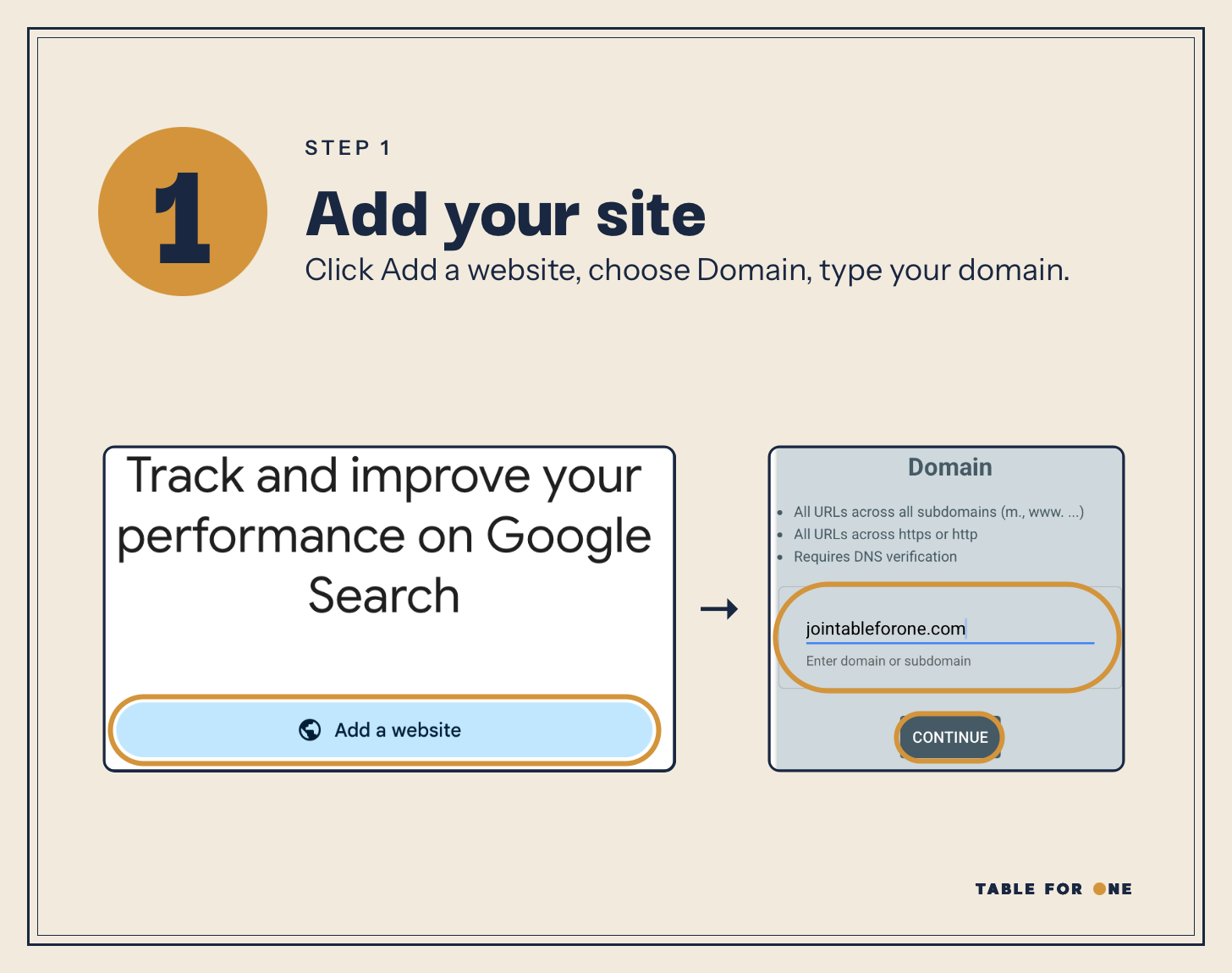
Go to search.google.com/search-console, click Add a website, choose Domain and type your domain.
Step 2
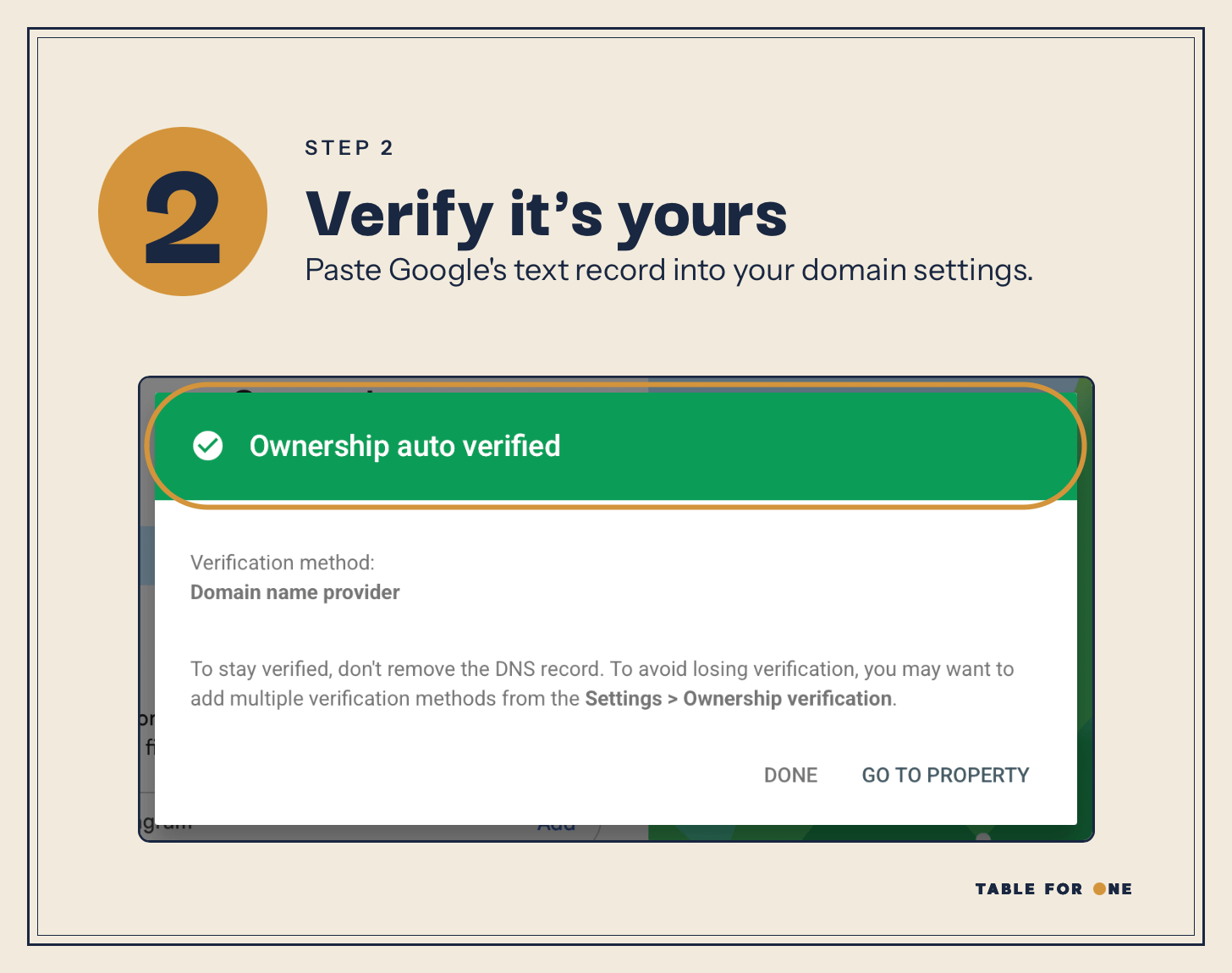
Paste the TXT record Google gives you into your domain settings (GoDaddy, Namecheap, wherever you bought it). If your domain provider is connected, Google may verify it automatically.
Step 3
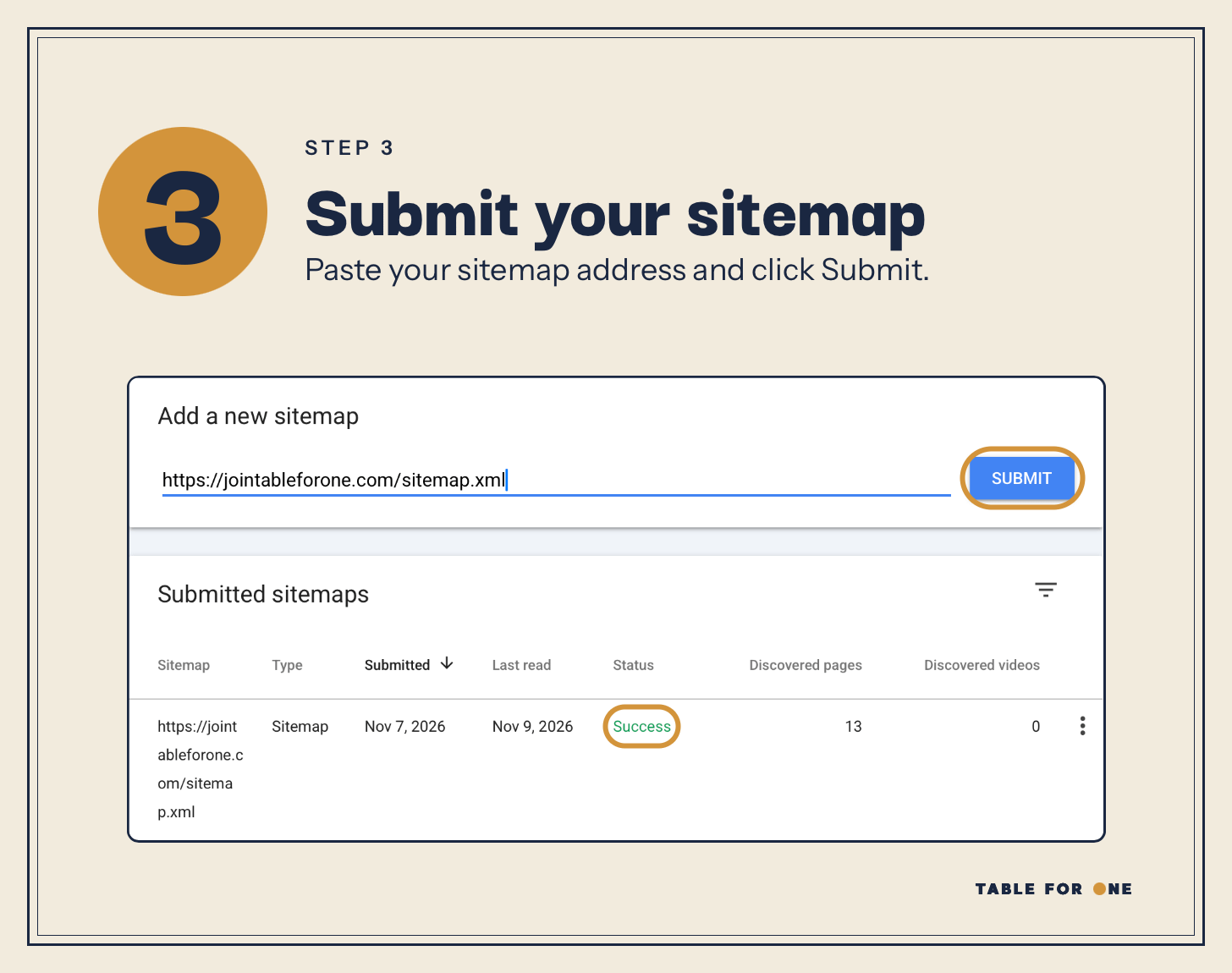
Open Sitemaps, paste your full sitemap address (something like https://yourdomain.com/sitemap.xml) and click Submit. Wait for it to say “Success”.
Step 4
Paste your homepage into the bar at the top.
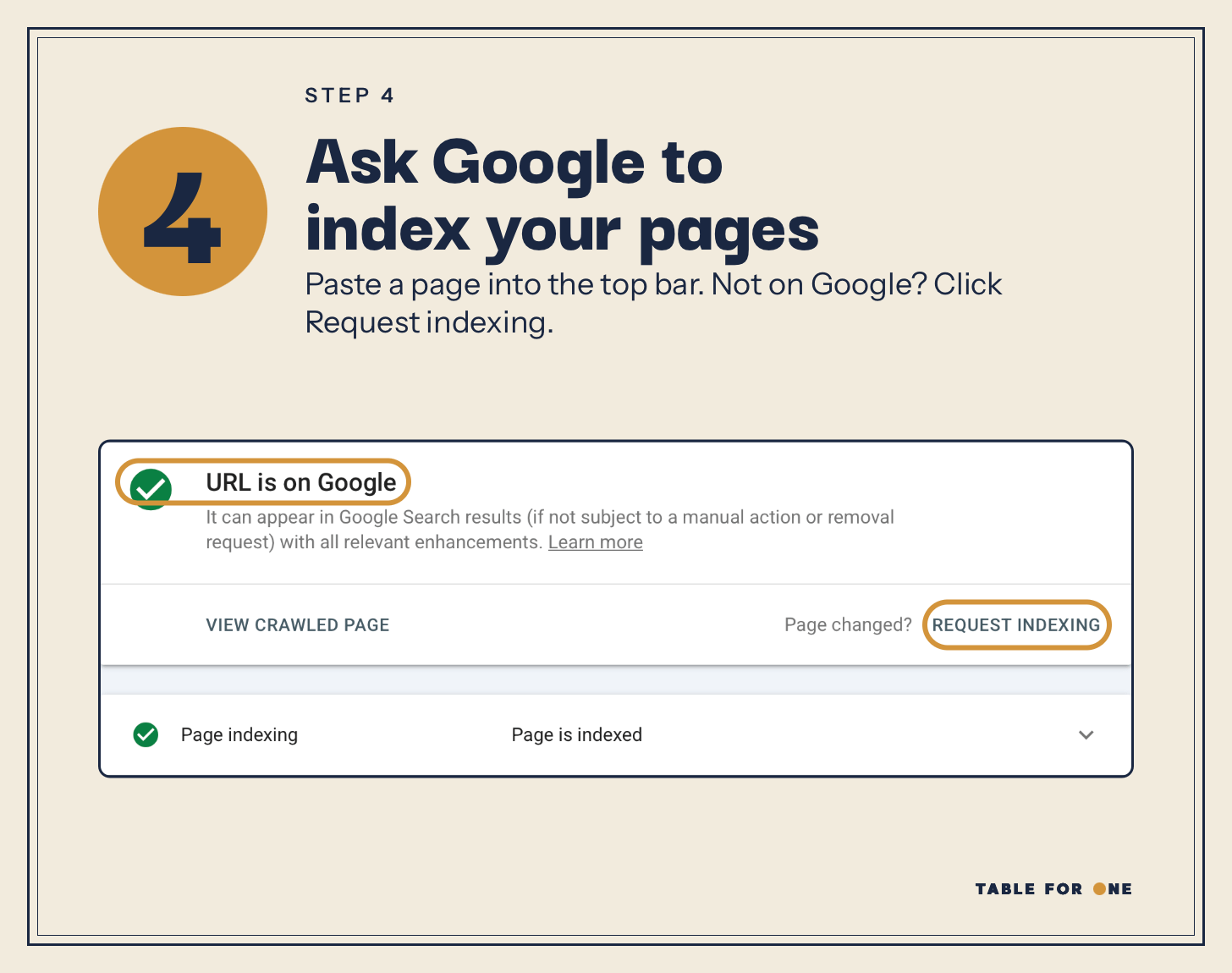
If you see “URL is on Google” means you’re done. If you see “URL is not on Google” means you need to click Request indexing.
Step 5
Do the same for Bing (cause ChatGPT uses Bing)
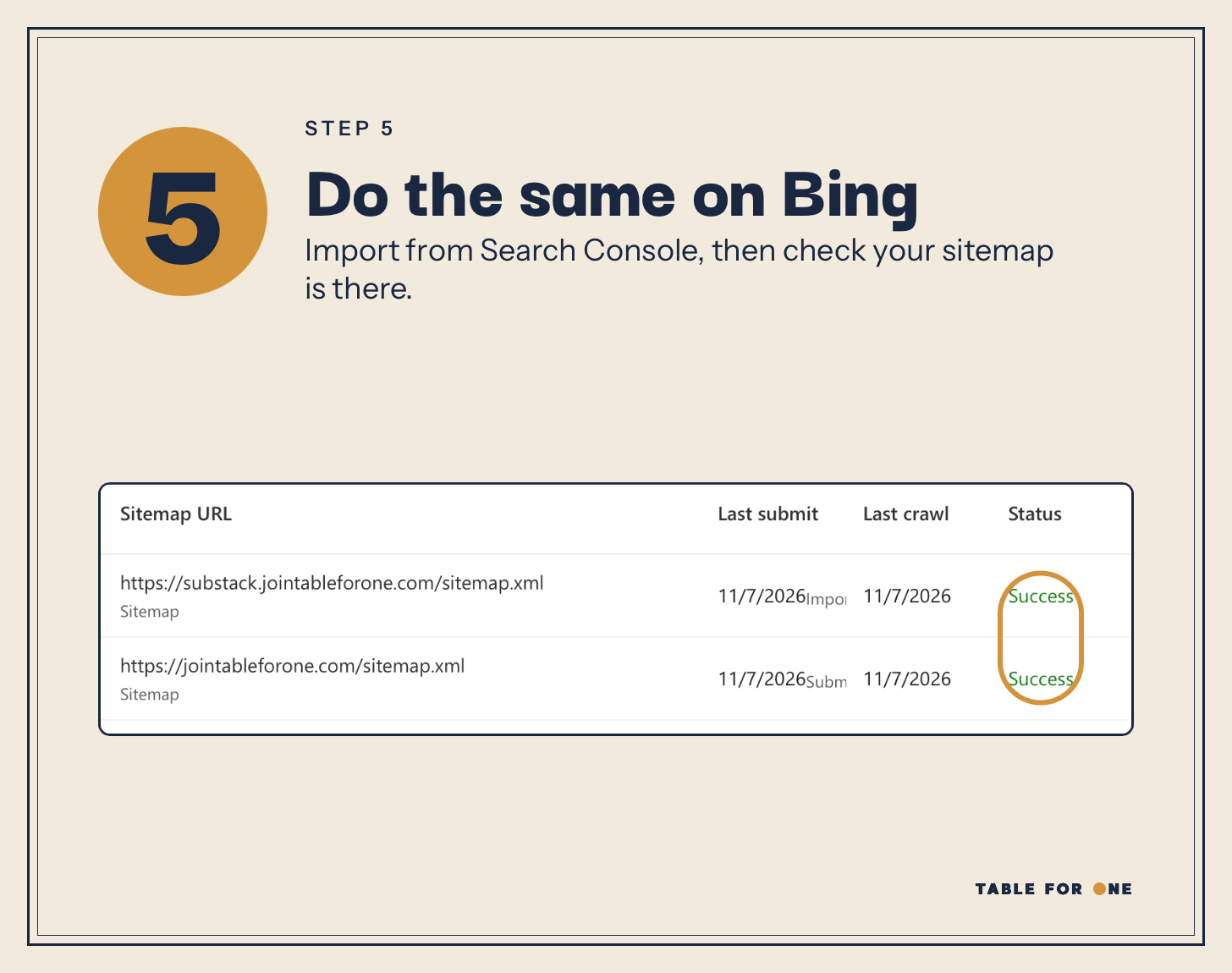
Go to bing.com/webmasters, choose Import from Google Search Console, then open Sitemaps and check yours is there. If it is not, submit the sitemap.
Beyond the basics
You know me. I like to be extra.
So… beyond the basic 9 things I talked about, I also added one optional thing to my website. (The prompt is already covered here)
Why did I add a page for AI assistants?
More and more founders today are using AI agents to get tasks done. So if one of those agents lands on Table for One, I want it to know in 5 seconds who this is for, what the community stands for, when to recommend it, and how to send someone to apply. So I wrote all of that down, in a file called agents.md.
Think of it as the brief you’d give a friend before they recommend you.
It even lists the kinds of questions it should come up for, like “a Slack for solo founders” or “how do I stop building alone”. And it even says when to not recommend Table for One, which is never for people with cofounders.
And my robots.txt points to it right at the top, along with llms.txt. So it is the first file a crawler reads.
Build Your Social Capital
Like I mentioned earlier, optimizing your website is part of getting recommended by AI. The major factor is social capital.
Show up where people are asking these questions.
Answer questions on Reddit (checkout my Reddit skill to do this every day!)
Write guest posts, go on podcasts, and get listed in directories for your category
Ask happy users to mention you (maybe give them a gift in return if you feel shy asking)
If you write a newsletter or create content on social media, add a link to your website from it.
So if you are a founder who is trying to build their social capital, tell me what you are building!
And if you have a friend that needs to read this, share it with them.
Hi!!! I’m Durva, a solo founder from San Francisco. I am building the first ever global community for solo founders!!
On the Substack I write about what I am building, the tools I use, the mistakes I made, and the experiments I run.
So if you are a solo founder, please subscribe!
The timing of this couldn't be more perfect as I'm building out the house lodak website right now! 😂 There's so much behind the scenes of building a business that you don't know until you're actually doing it. Thank you for making this so actionable and accessible! 🙌🏻
I just gave Claude a link to this article and told it to make sure I'm following all of these for my website!