


Okay, I am officially doing too much.
I have a community for which I am actively looking for partners, I’m building a meal planning app, trying to establish my fractional GTM practice, building a personal brand, and learning how to brew beer.
And if you are like me, extremely ambitious but love the anxiety of working on a THOUSAND different projects, I bet your mailbox feels like a mess (your day feels like a mess too, but more about that later!).
Over the last two months I started to get overwhelmed with keeping track of everything that was happening and responding to opportunities on time. I missed important emails, I couldn’t answer people on time, and I just felt horrible for losing good opportunities.
So I decided to give AI agents like Town a try. I tried it for a month and my inbox felt a lot more manageable.
But I already pay $200 for Claude and $14 for Granola, and I didn’t want to add another subscription on top of it. So I started tinkering to see if Claude could do what Town was doing... and voila! It did!
What Town Got Right
I gave Town access to all my mailboxes. And the thing I loved most was that it kept the context of the entire thread.
It would tell me the discussions I have had with the person I am meeting with. It would give me context about that individual and their company. And it would also help me keep track of the things I needed to do!
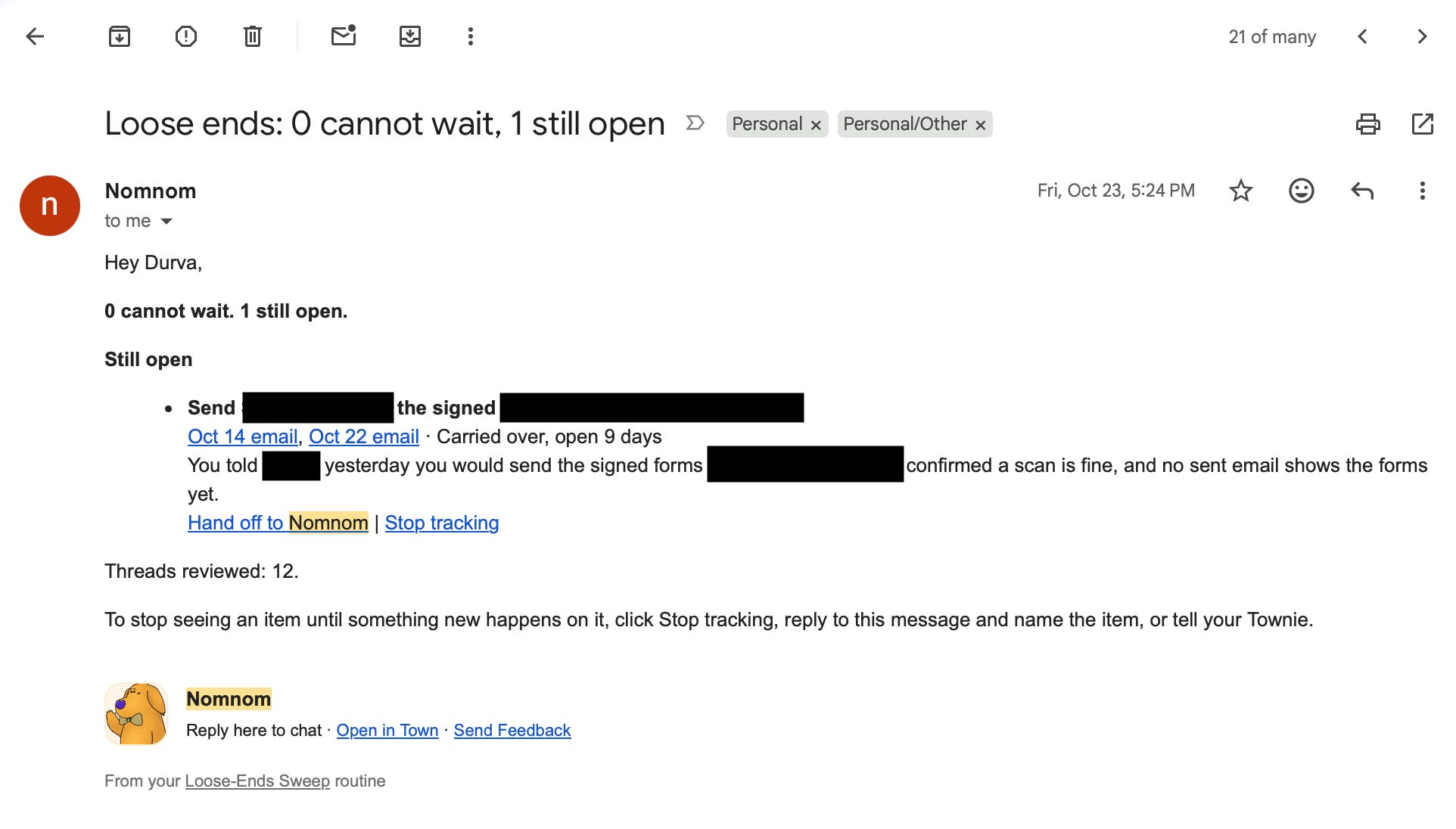
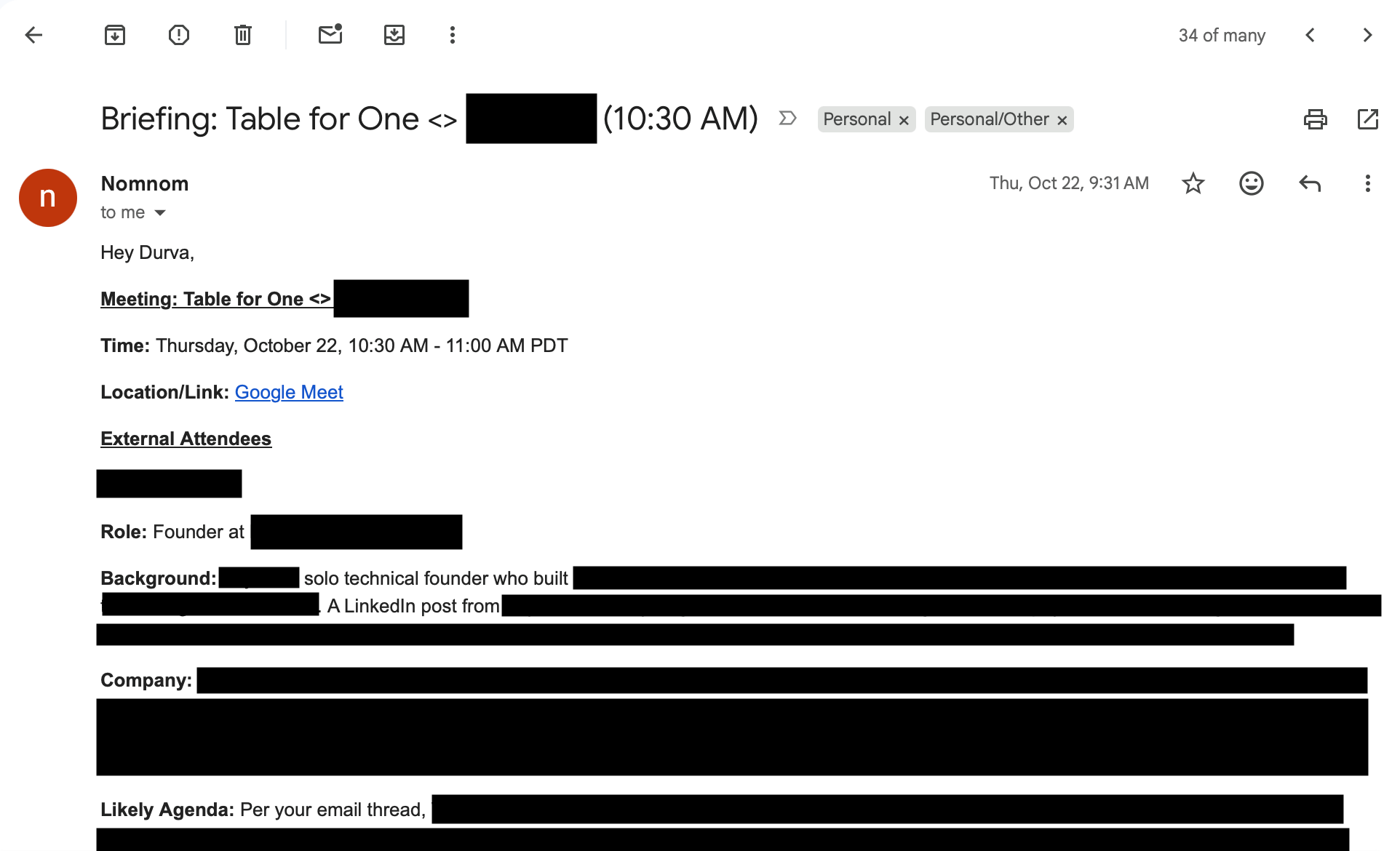
So this was pretty magical I would say.
But I genuinely did not want to spend $15 a month on something I thought my Claude could handle.
What Mine Does
Every morning at 6.30 am, before I even open my laptop, my inbox is already sorted.
The only emails left in it are the ones waiting on my reply and the ones the agent couldn’t figure out. Everything else is labelled by project and out of the way.
It also gives me one short brief per project. Tells me who is the sender, what they want and by when.
I can literally read the whole thing in under two minutes!
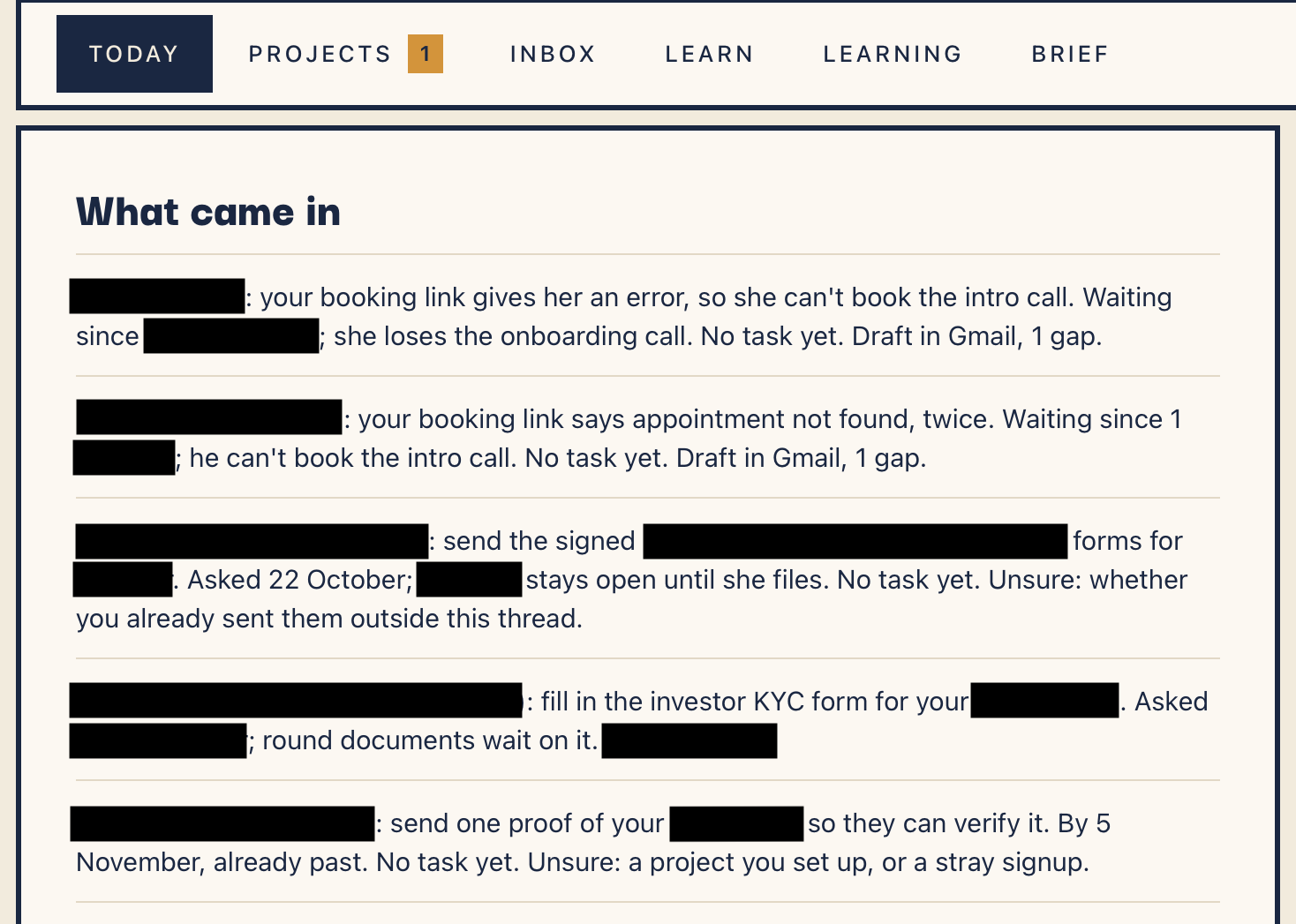
The whole pipeline is designed to sort my emails, build context, find opportunities (according to what I am working on), and draft replies to the emails that require replies.
The way this pipeline is designed is with the help of 4 skills.
Inbox Sorter: it labels every email by your rules and takes everything that doesn’t need you out of the inbox.
Inbox Triage & Brief: it reads every new email once, all the way through, and writes one short brief per project. It’s the only one that reads your mail.
Opportunity Sorter: it gives a verdict on every pitch by your pitch rules: what they want, what you’d get, what to ask for back.
Email Reply Drafter: it drafts replies in your voice inside each thread ready for you to send.
How To Connect Your Gmail?
Before we get into building this, let’s get some housekeeping out of the way.
You only have to do this once. But here are the steps.
Click on your name > Settings > Customize > Connectors (tab now) > Gmail > Click Connect. And sign in with the Google account you want sorted.
Say yes to reading and searching mail, creating labels, adding and removing labels, marking as read, and creating drafts.
Block sending, replying, forwarding, trash and spam.
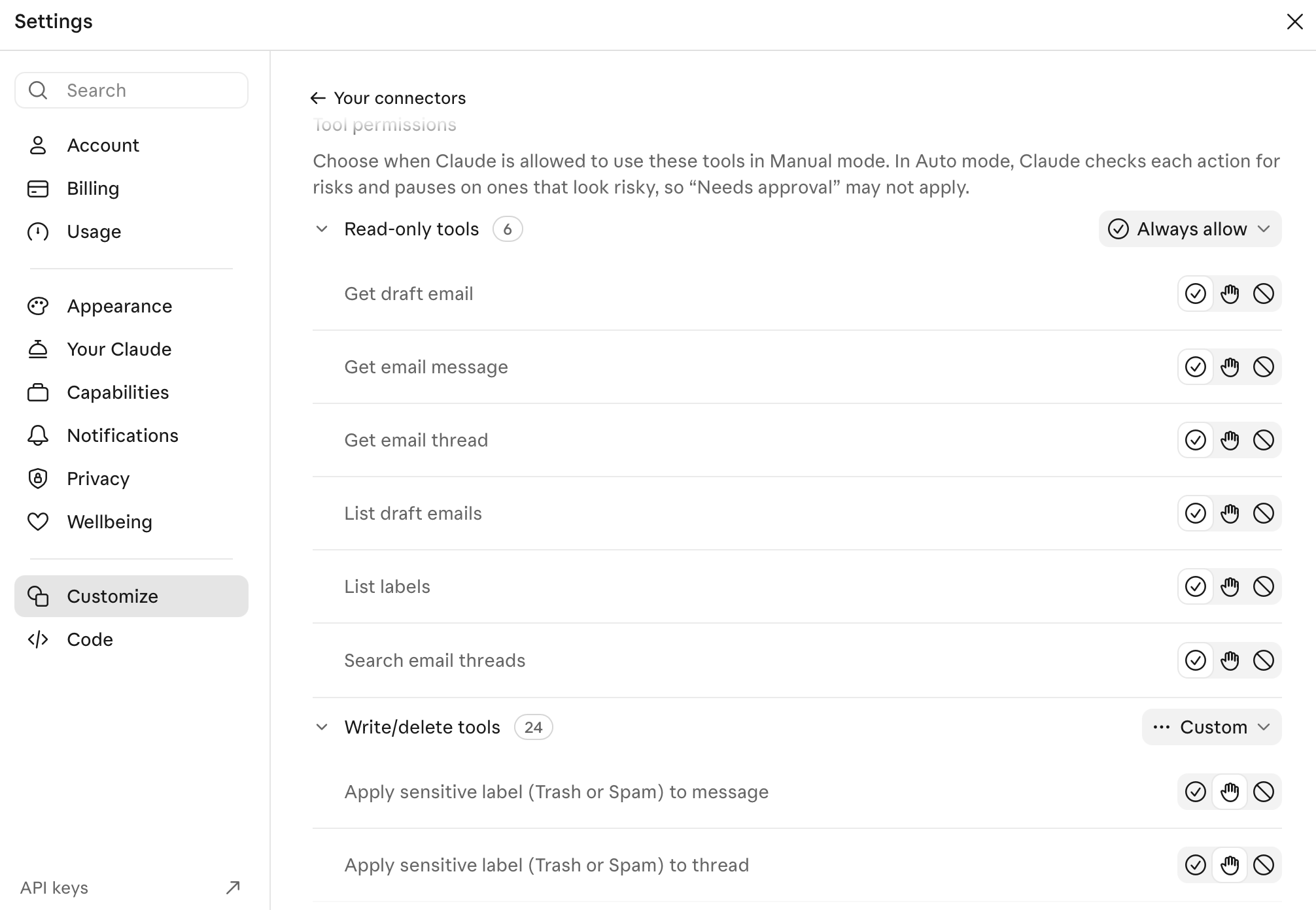
If you download the skills that I have created, I have added strict instructions for Claude to ask before sending anything.
Another thing to know is that since Claude reads your emails, the information does go to Anthropic while it is working on it.
If your setting that lets Anthropic use your chats to improve Claude is off, chats are kept for 30 days. If it’s on, de-identified chats can be kept for up to five years.
To change this, go to Settings > Privacy > and toggle the Help improve our AI models off.

I have a separate email that I use for banking and any sensitive information. If you don’t have something like this, you can always create a Private label and ask Claude to exclude anything in that label in the run.
Build It Yourself!
Paste these into Claude one at a time, starting with the rules file.
Interview me, one question at a time, about every project I run and the kinds of email each one gets. Then write a file called inbox-rules.md with:
- Labels: one per project. If I only have one project, no labels.
- Project rules, numbered, first rule that fits wins. Rule 1 is always job mail if I'm job-hunting: a recruiter, an application, an interview, an offer or a rejection, whoever sends it. A job board's newsletter is not job mail. The last rule catches everything else.
- Needs-reply: a person asked me something and the last message is theirs.
- Unsure: when you can't tell, say what you couldn't decide.
- Marking read: automated mail and newsletters only, never a person. A person beats a label.
Don't save it until I've read it and said yes.
This one will interview you about your project (or projects!) and write your rules. Make sure you read every rule before you accept it.
This is how I have structured my inbox
## Labels
{These are mine. Please add yours}
TFO: table-for-oneWhysk: whyskPersonal: personal
Project rules
A recruiter, a job application, an interview, an offer or a rejection, whoever sends it: Personal, and add Personal/Jobs.Sent to hello@whysk.app: Whysk. Add Whysk/Users when the writer is using or testing the app, or is on the waitlist.Automated mail from a tool or service: Personal. Never Needs-reply.Anything else: Personal.
The first rule that fits wins. And when it can’t decide, it leaves the email in my inbox marked Unsure.
Build a Claude skill called inbox-sorter. It labels every thread in my inbox by inbox-rules.md and takes it out of the inbox unless it needs my reply or you're unsure. 300 threads a run, newest first. Gmail hands back 50 a page: follow the next page until you have 300 or there are none left. Read only the sender, subject, first and last message. Mark automated mail and newsletters read, never a person's mail. Log the time you ran; the next run starts from that time, never "the last 24 hours". You may add labels, archive and mark read. Never delete, send, draft, reply or mark spam.
This run will sort everything for you.
Build a Claude skill called inbox-reader. It is the only skill that reads my email in full. Each run, read every thread with a message since your last run, in every label and in the inbox. Skip newsletters and automated mail, but never skip automated mail about a job application (receipts, rejections, interview invites, scheduler reminders). Never decide by unread. Read each thread whole.
For every new message I didn't write, append one reading to readings/<today>.md: who (a name, never an email address), company, project, kind (reply, do, opportunity, decision, job, record, nothing), for job mail the move it means (interviewing, rejected with only the reason the email gives, offer, round announced, receipt, reminder), the one line from the email that shows it (in quotes, at most 30 words), and what: what it says and asks in at most 40 words, with every date, amount and term. Never an address, phone number or link anywhere. Never invent a reason, date or term.
Then write one short brief per project from the readings: reply, do, opportunity, decision. One line per thread: who, what they want, by when.
Before you write the skill, ask me for three real emails and show me the readings you'd write. Then put 3 good and 3 bad example readings into the skill, each bad one with a note on why it's wrong.
This will read every email in your inbox and write a brief for you. After your first run just check that it did not hallucinate.
For each of my projects, ask me which pitches are worth a reply, what I can offer back and what’s never worth a reply. Give me numbered options that fit that project (a newsletter gets sponsorships, guest posts, podcast invites; a B2B product gets integrations, design partners, investors), one message per project. Write my picks into opportunity-rules.md, one section per project, nothing I didn’t pick.
This one helps you find the right opportunities!
Build a Claude skill called reply-drafter. Work only from today’s readings and briefs, never search my mailbox. Before writing any draft, read my voice-profile.md, writing-style.md and anti-AI list; if one is missing, ask me one question for it and write a starter file. For every thread in the Reply pile, open that one thread and create a draft reply inside it, in my voice, matching how I’ve written to this person before. Anything only I can decide (a price, a date, a yes) goes in [brackets]. Never send. Never make a second draft on a thread that already has one.
For every reading of kind opportunity: say what they want, what I’d get (from the reading’s “what”), worth it yes or no (never maybe), and one thing to ask for back. Judge each pitch only by opportunity-rules.md. If a project has no rules, say “your call” instead of yes.
This will write your replies and judge your pitches. After the first run, open your drafts and check if the replies make sense.
And this last one will build a page you can see so that you don’t have to stare at your claude chat or a terminal.
Build one page I can open by double-clicking: inbox.html, in the folder these skills write to. One file, no internet needed, no scripts. A sidebar on the left with four sections and a count beside each, one section showing at a time: Brief (every project’s reply, do, opportunity and decision piles, one line per thread with a link to open it in Gmail), Pitches (each verdict, what they want, what I’d get, what to ask back, and the rule it’s based on), Drafts (each draft, who it’s to, and the one thing I should check before sending), Sorted (how many threads went to each label). Each skill rewrites only its own section when it runs, then rebuilds the page from all four, so a later skill never wipes an earlier one. Each section shows the date it last ran, and a section that hasn’t run yet says not yet. Never an email address anywhere on the page. Make it readable on my phone too.
Before anything is committed, search every file you wrote for an email address. Replace any you find with a SHA-256 hash of the address (lowercased, trimmed). Refuse to commit until there are none.
Automate Everything!
My agent is set up as a scheduled cloud routine that Claude runs every morning at 6.30 am. If you want this to be a cloud run, you need to use Cowork and upload all your voice files there. If you are using Claude code, you need to set up a GitHub repo and push everything there.
Make the sorter and the reader run every morning at 6:30 in my time zone, sorter first, reader second, even if the sorter fails. Use a scheduled task on the folder these skills write to. The run asks nothing. Gmail: the sorter may label, archive and mark read; everything else is read only.
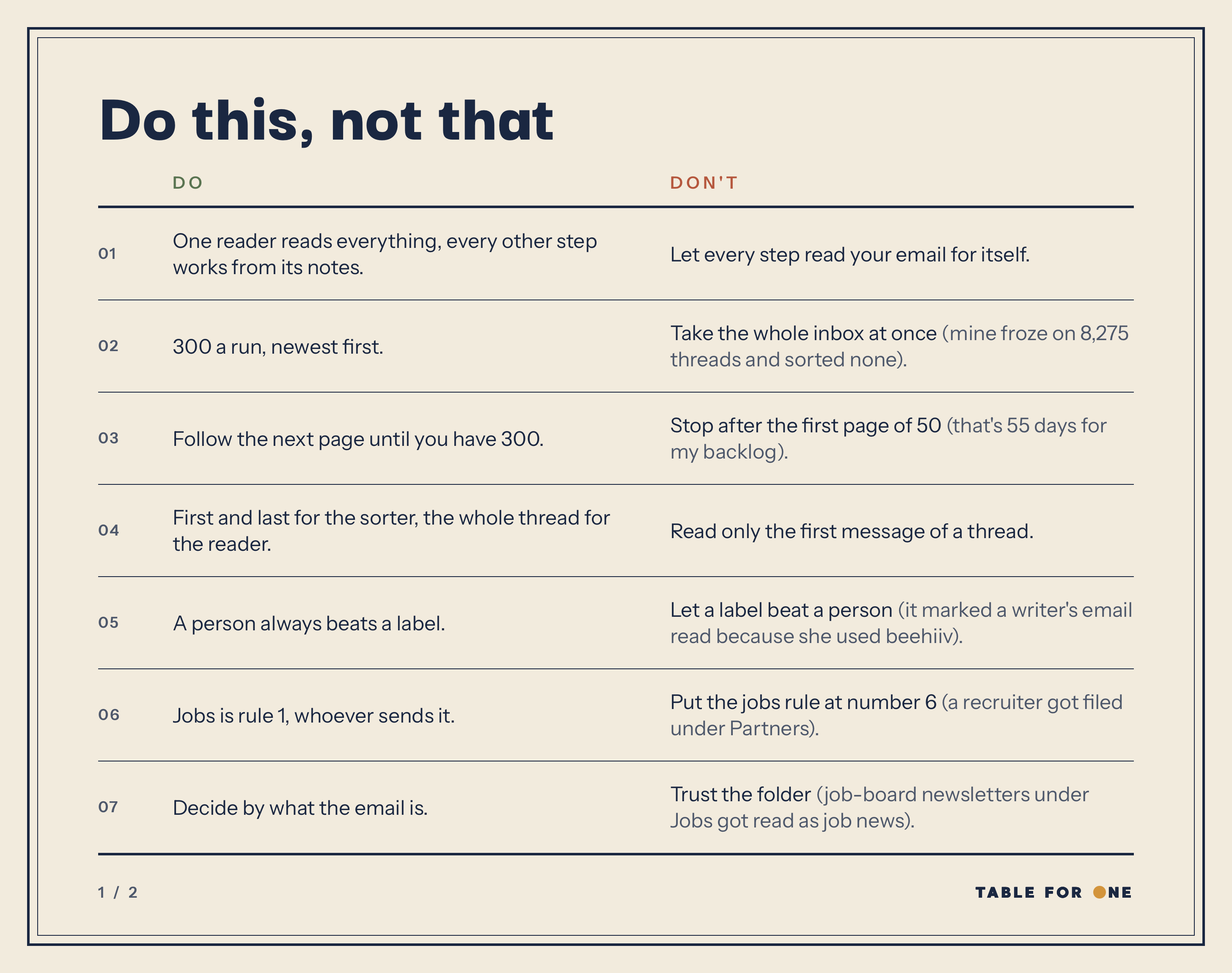
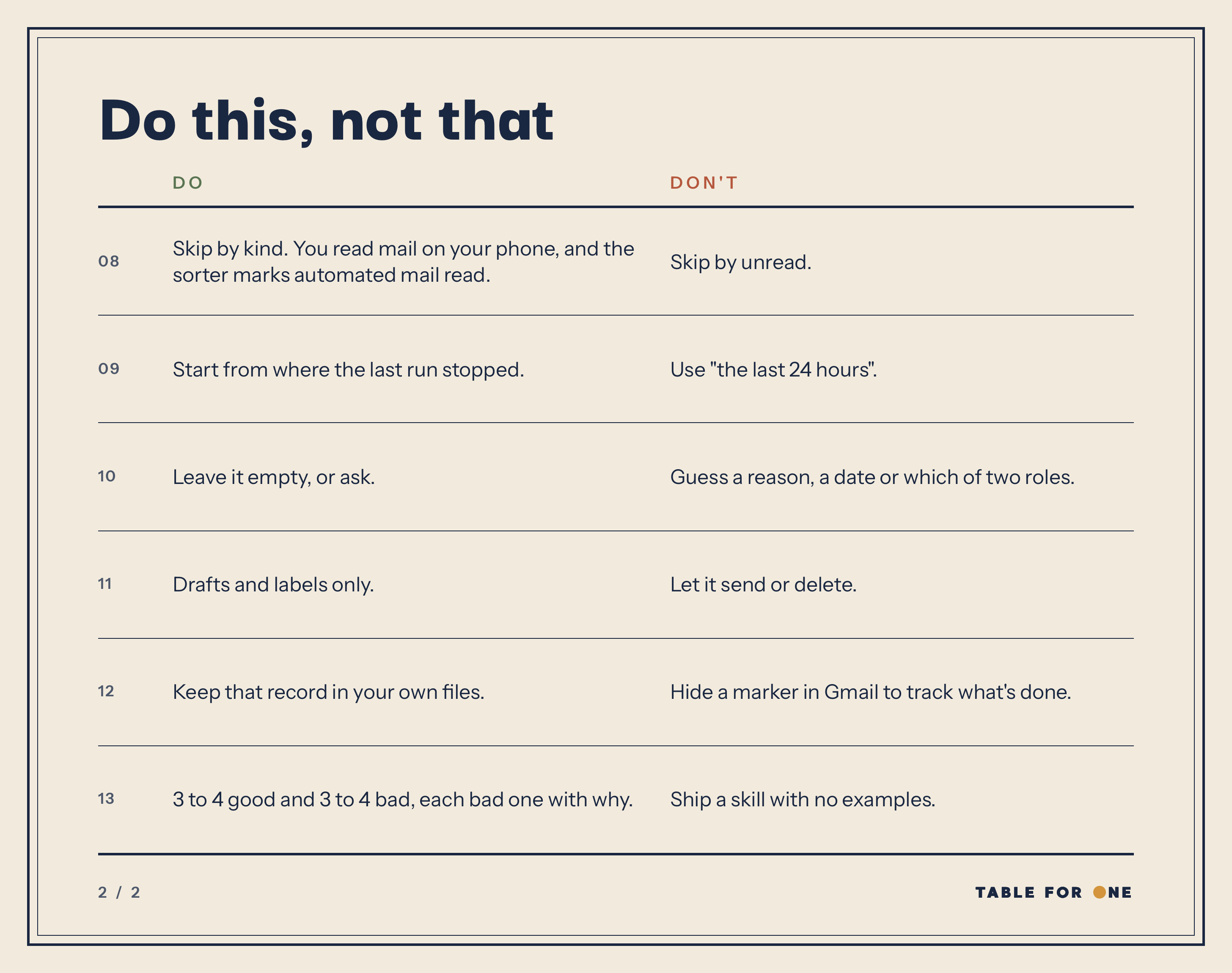
Do This, Not That
The build I am sharing with you took a bunch of stupid mistakes. So here are some things you should do and some that you shouldn't .
If you would rather skip the hassle of building these, I have the complete skill pack ready to download. It also comes with my anti-ai writing style.
Table for One is a community of early-stage solo founders. If you are building something as a solo founder, join us!
